
Player whitelist access is not open yet. You can install the game, save the server and download optional mods now. A password does not grant whitelist access.
Use Minecraft Java 1.21.8 on Windows, macOS or Linux, with server address mc.waifu.vn. Download the official launcher and sign in with a Microsoft account that owns Java. Minecraft for Windows is Bedrock.
Prepare while waiting: complete section 2 and reach the main menu, try a Singleplayer world, save the server in section 3, and optionally install the modpack in section 7. These steps do not need whitelist access. Read section 5 before requesting access; section 4 applies after approval.
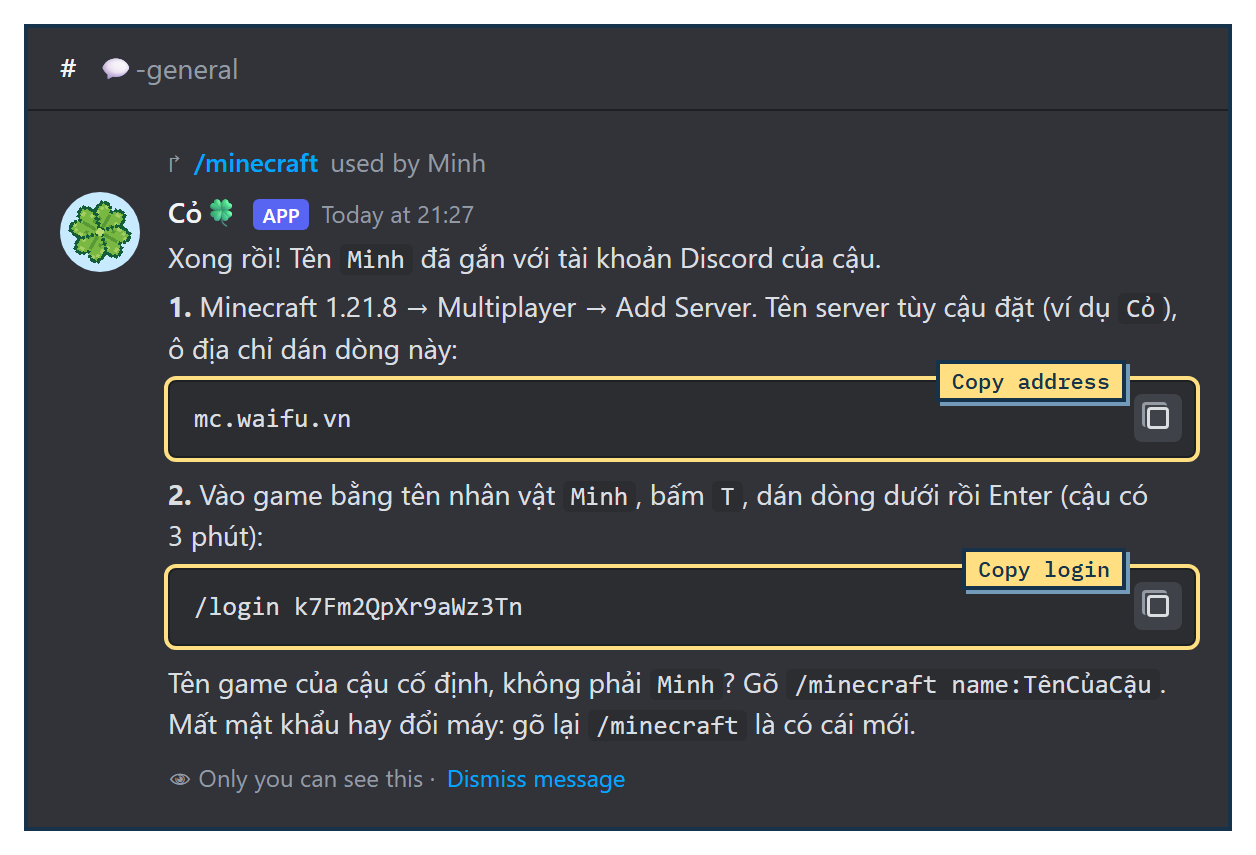
1. Type /minecraft in Discord
In HỘI MÊ CỎ, use /minecraft name:YourJavaUsername with your exact in-game Java username, rather than your Discord display name. A bare /minecraft reuses your last linked name or generates one from Discord, which may differ from your Java username.
Only the alpha roles in section 5 can receive a password. Eligible members get a private reply in the channel. Keep the name and /login line private. This command does not add you to the whitelist.
2. Pick version 1.21.8
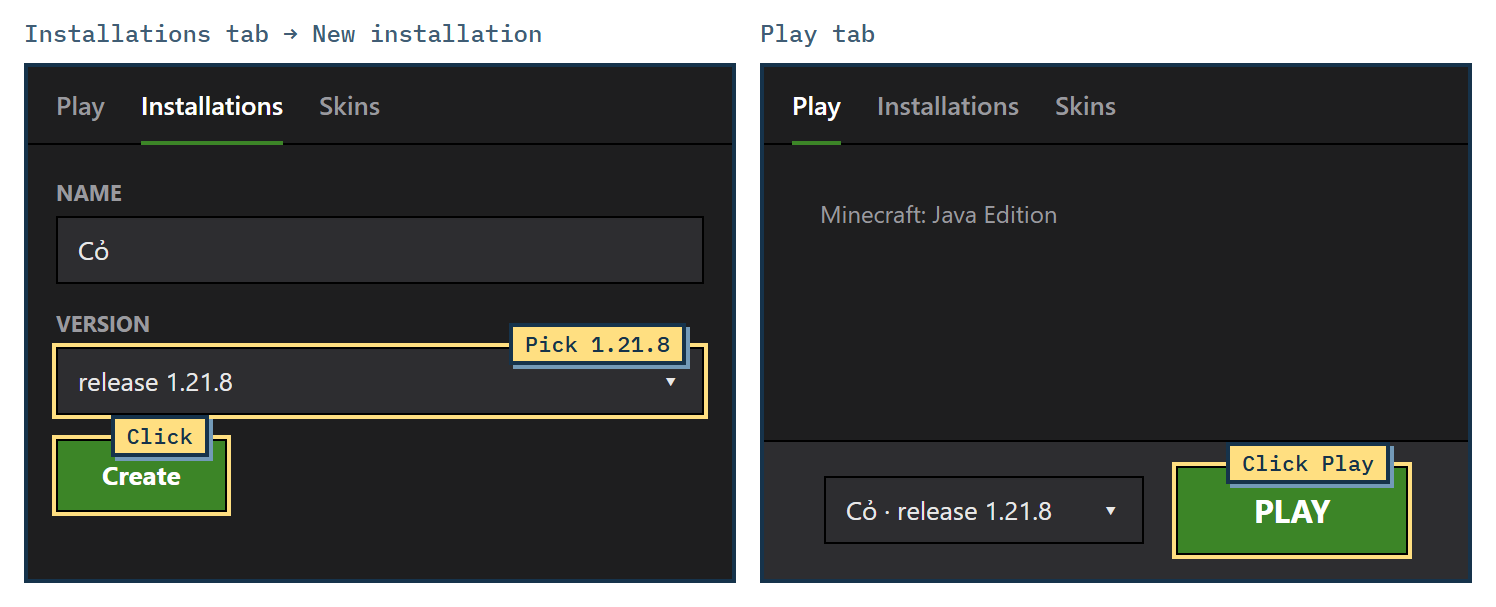
Open the launcher, go to Installations → New installation, set Version to release 1.21.8 and click Create. On the Play tab, choose the new installation and click Play. “Latest release” can't join the server yet.
3. Add the server
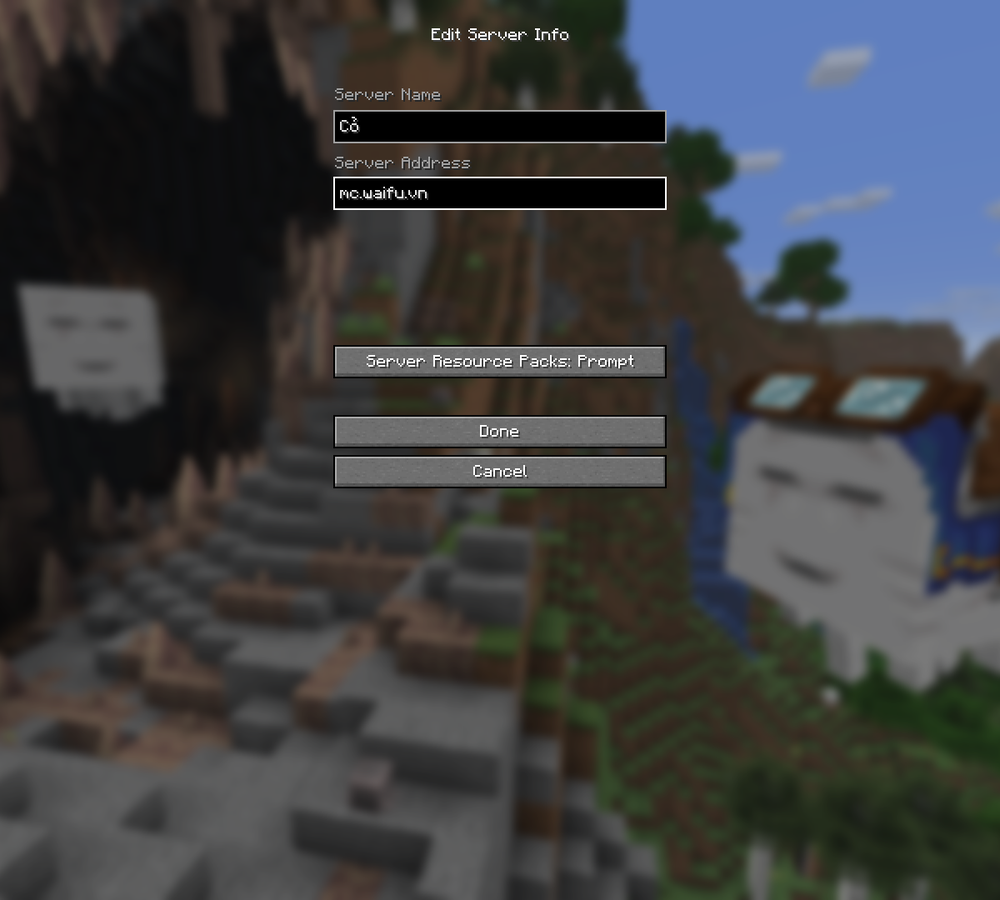
Go to Multiplayer (click Proceed if a warning shows) → Add Server, paste mc.waifu.vn into Server Address → Done. You can save the server now. Once whitelist access is approved, select it and click Join Server.
4. Paste the login line
Press T, paste the /login … line and press Enter. The green line You are now authenticated. means you are logged in. If you don't log in within 3 minutes, the server disconnects you; join again and paste the line again.

Playing on phone, console or Bedrock
The server has Geyser/Floodgate configured for Bedrock, but this guide has not been verified on a real Bedrock device. Java 1.21.8 on a computer is the verified route. You can install Bedrock and sign in to Microsoft beforehand; server access still requires whitelist approval.
- Address:
ember.pikamc.vn, port25765. On mobile and Windows Bedrock, use Play → Servers → Add Server. Xbox, PlayStation and Switch generally do not offer custom server entry; this guide has no verified console workaround. - Bedrock uses an Xbox (Microsoft) account. Floodgate is configured to replace
/minecraftand/login; that login flow has not been verified on a real device. - In game your name gets a dot in front, so the Xbox account
Minhshows up as.Minh. When you ask to be added to the list (section 5), send your exact Xbox name and say you play on Bedrock. - Bedrock version compatibility has not been confirmed on a real device. Include your game version when asking for help; do not buy the game based only on this section.
- The mod pack in section 7 is for Java only. On Bedrock you won't hear Cỏ's voice in game or be able to use PatPat; chat and everything else work the same as for Java players.
5. Who can join right now
The server is in alpha with a whitelist. Player access is not open yet. Anyone can install the game, download mods and save the address. Password issuance is role-gated and separate from whitelist approval. A whitelist rejection or You are not authorized to join this server! means you need approval; reinstalling the game will not fix it.
During the alpha, people who hold one of these roles in HỘI MÊ CỎ will be let in: 🌱 Rễ Cỏ🍀, 🌸 Rễ Cỏ🍀 Tri Kỷ, 🌟 Rễ Cỏ🍀 Super Fan, 👑 Rễ Cỏ🍀 Vàng, 🥈 Rễ Cỏ🍀 Bạc, 🥉 Rễ Cỏ🍀 Đồng, 🍼 Bảo mẫu and 💚 Fan ruột. If you have a role, post in 🆘-help-feedback in HỘI MÊ CỎ with your Minecraft name. The team reviews and adds names manually. The opening date is not confirmed; having a role or submitting a name does not mean access has been granted.
Send only your exact Java username or Xbox gamertag and your edition/device when asking for access. Keep your /login password private. While waiting, check that the game launches on your device.
6. Ask Cỏ for help
Cỏ is in the server as Co_AI. Press T, type “Cỏ ơi” and say what you want, for example “Cỏ ơi cho tớ xin ít gỗ” (can I have some wood), “làm cho tớ cái cúp đá đi” (make me a stone pickaxe), “đi theo tớ” (follow me). Cỏ climbs cliffs and trees, digs out of pits, makes missing tools and hands over whatever she can craft. She is still clumsy, so if a task isn't finished, ask again. While she is being fixed she may be away for a while. When no player has been on the server for 15 minutes, Cỏ leaves and the server pauses: world time stands still until someone joins. You can still join as usual, and she is back about a minute later.
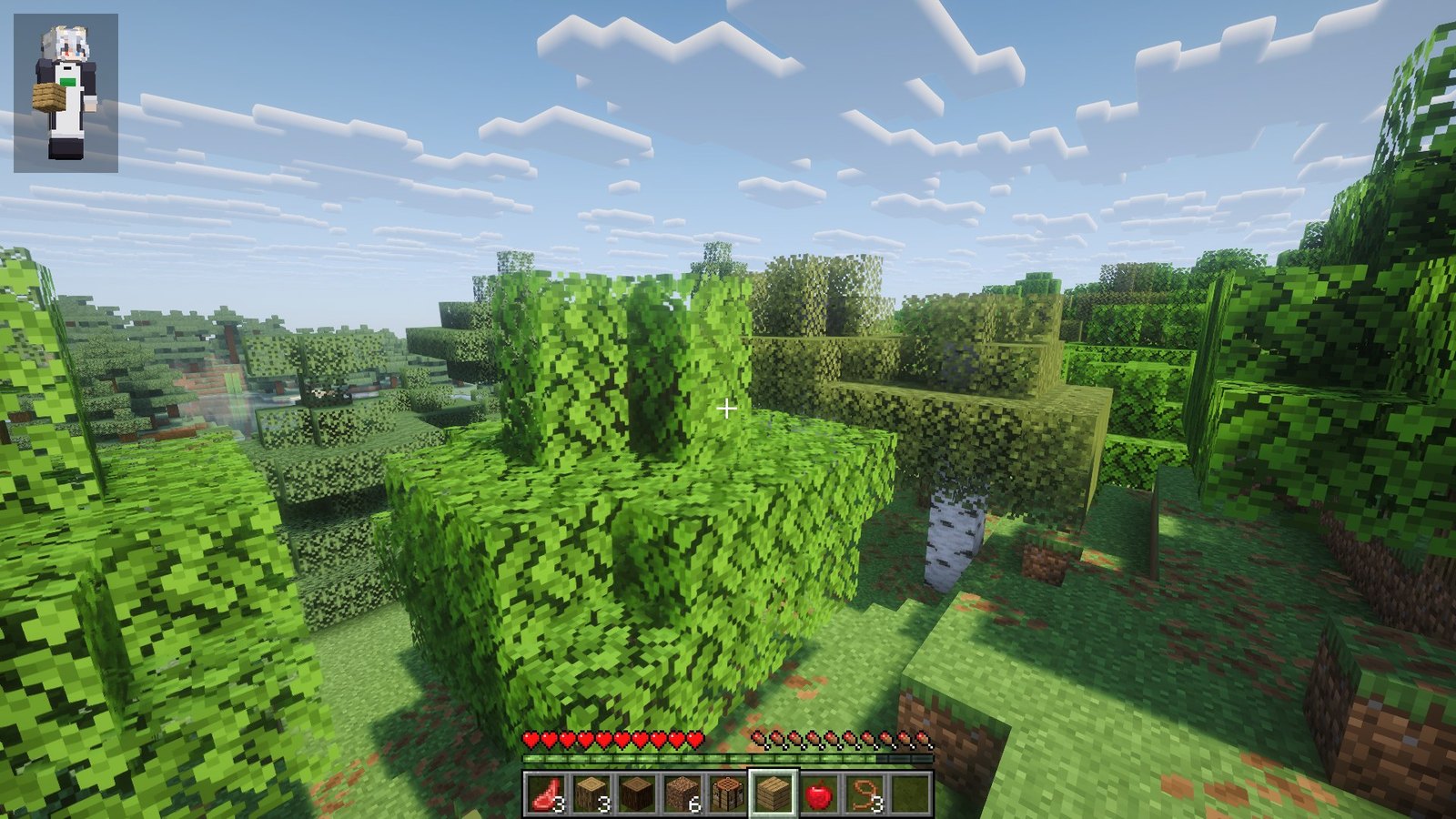
Type !stats or !inventory to see Cỏ's health, position and inventory.
Does Cỏ in the game remember you from the livestream and Discord?
Yes, once she knows it is the same person. Cỏ on the livestream, Cỏ in Discord voice channels and Cỏ in Minecraft share one memory. Something you told her on stream can come up when she meets you in game, and what happens in game can come up on stream.
- The Minecraft name you get with
/minecraftis tied to your Discord account, so Cỏ in game knows who you are on Discord. - For her to recognise you from the livestream, link your stream account to Discord: in HỘI MÊ CỎ type
/kiokuand follow the button the bot sends. The bot reads the verified YouTube and Twitch connections on your Discord account. For TikTok, the bot gives you a line likekioku-…; type that exact line once in chat while Cỏ is live on TikTok. - Without a link, Cỏ treats your game name as someone new, even if she knows you well from stream.
- Bedrock players don't go through
/minecraft, so for now Cỏ only remembers you by your Xbox name in game.
Cỏ remembers what you say to her and what is said in public places: livestream chat, public Discord channels and in-game chat. Private messages and staff-only channels do not go into this memory. When you link with /kioku, the bot only reads your name and verified connections, never your messages or friends list, and you can remove its access in your Discord settings at any time.
7. Install a client with mods that update themselves (optional)
Plain Minecraft Java 1.21.8 can join after whitelist approval and login; mods are optional. If you want to hear Cỏ and pat each other, the least work is Prism Launcher with Cỏ's modpack. The pack holds Fabric API, Simple Voice Chat and PatPat, all Fabric 1.21.8 builds. Every time you press Play, Prism syncs the pack, so new mods and updates arrive on their own.
- Install Prism Launcher and add a Microsoft account that owns Minecraft Java under Accounts. Click Add Instance, pick Minecraft
1.21.8, set Mod loader to Fabric (the pack uses0.19.5), then click OK. Use Java 21; enable automatic Java download in Prism settings if needed. - Right-click the instance → Folder → Minecraft Folder. Download packwiz-installer-bootstrap.jar and put it in the folder that opens.
- Go to Edit → Settings → Custom commands, turn on Override global settings, and paste this into Pre-launch command:
"$INST_JAVA" -jar packwiz-installer-bootstrap.jar -g -s client https://waifu.vn/mc/pack/pack.toml
- Click Play. The first launch downloads the mods; later launches only update what changed.
Simple Voice Chat can transmit your microphone. If you only want to listen to Cỏ, mute your microphone in the mod settings and check its status before playing. Every line Cỏ types in chat is read aloud where she stands: you hear it within 24 blocks, from the direction she is in. Press V for voice settings. To talk with other players, join a voice channel in HỘI MÊ CỎ. With PatPat, crouch (Shift) and right-click with an empty hand to pat Cỏ and other players.
Troubleshooting
- No
/minecraftcommand: it only exists in the HỘI MÊ CỎ server. - Name already taken: check your exact Java username. If it is already linked, ask in 🆘-help-feedback rather than choosing a name you cannot use in Java. Each Discord account can link up to 3 names.
- Missing role: see section 5. You can still install the game and mods, but the command will not issue a password.
- You are not authenticated! or disconnected after 3 minutes: you have not logged in yet, or the line was pasted wrong. Type
/minecraftagain for a new password, rejoin and paste the whole/login …line. - Forgot the password: type
/minecraftagain to get a new one. - You are not authorized to join this server!: your name is not on the list yet. Post in 🆘-help-feedback with your Minecraft name; see section 5.
- Outdated client or Outdated server, which means a version mismatch: the server runs exactly Java 1.21.8. Pick
release 1.21.8in step 2, not “Latest release”. - Bedrock cannot join: check the address
ember.pikamc.vnand port25765. Bedrock version compatibility has not been verified on a real device. If it says you are not allowed in, post your Xbox name in 🆘-help-feedback and say you play on Bedrock. - Cỏ doesn't recognise you from the livestream: type
/kiokuin HỘI MÊ CỎ to link your stream account to Discord. - Can't hear Cỏ: press
Vto check voice is on, check the Voice Chat volume, and move within 24 blocks of her. If voice says it cannot connect, check that Simple Voice Chat is the Fabric 1.21.8 build and that your network or firewall is not blocking UDP port25785. - The modpack does not update: check that
packwiz-installer-bootstrap.jaris in the instance's Minecraft Folder and that the Pre-launch command is pasted exactly. Restart the launcher and press Play to sync again. - The game says Fabric or Fabric API is missing: the instance must use the Fabric mod loader (step 1 of section 7). Without Prism, install Fabric Loader for 1.21.8 and add Fabric API.
- Items or builds gone after a server reset: this is the risk of the alpha test, and the data cannot be restored.
If you get stuck on a step, post in 🆘-help-feedback in HỘI MÊ CỎ.